

High Availability
Summary
To ensure high availability for your workloads:
- Use at least 2 replicas.
- Prefer stateless application design.
- Use Topology Spread Constraints or Pod Anti-Affinity to distribute pods across zones.
- Monitor your deployments and test failover scenarios regularly.
If you need help adapting your deployment manifests or Helm charts, feel free to reach out to our platform team.
Introduction
All of our environments provide high-availability (HA) by leveraging all three available Availability Zones , reducing the risk of downtime due to zone-level failures.
To benefit from this HA setup in your own deployments, your applications must be designed to run in a stateless manner and support multiple replicas. This allows Kubernetes to distribute your workloads across zones and recover from failures automatically.
⚠️ Important: If your application maintains state, consider using external storage or state management solutions that are zone-resilient.
ℹ️ Information: High-Availability protects against infrastructure-level failures such as zone or node outages. It does not mitigate issues caused by application bugs, misconfigured deployments, or external service failures.
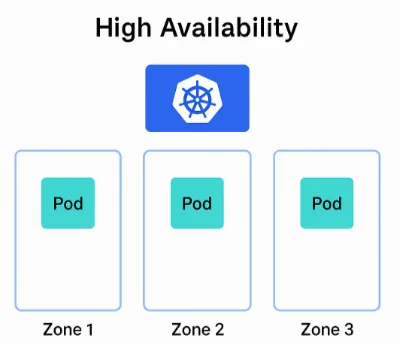
Multiple Replicas
To enable HA, your deployment must run at least two replicas of each service. This ensures that Kubernetes can schedule pods across multiple zones and maintain availability even if one zone becomes unavailable.
spec: replicas: 2You can also combine this with horizontal scaling, but make sure the minimum replica count is always 2 or more.
Distribution of Pods Across Zones
To ensure that your pods are distributed across zones, Kubernetes provides mechanisms like Topology Spread Constraints and Pod Anti-Affinity. These help avoid placing multiple replicas on the same node or in the same zone.
Option 1: Topology Spread Constraints
This is the recommended approach for zone-aware distribution. It allows fine-grained control over how pods are spread across zones.
spec: topologySpreadConstraints: - maxSkew: 1 topologyKey: "topology.kubernetes.io/zone" whenUnsatisfiable: DoNotSchedule labelSelector: matchLabels: app: my-ha-app- maxSkew: Maximum difference in the number of pods between zones.
- topologyKey: Use “topology.kubernetes.io/zone” for zone-level spreading.
- whenUnsatisfiable: Prevent scheduling if the constraint cannot be met.
Option 2: Pod Anti-Affinity
This ensures that pods with the same label are not scheduled on the same zone or node.
spec: affinity: podAntiAffinity: requiredDuringSchedulingIgnoredDuringExecution: - labelSelector: matchExpressions: - key: app operator: In values: - my-ha-app topologyKey: "topology.kubernetes.io/zone"You can also use “kubernetes.io/hostname” as the topologyKey to spread across nodes instead of zones.
⚠️ Important: Pod anti-affinity can enforce strict separation of pods across zones or nodes, but may lead to unschedulable pods if resources are limited—unlike topology spread constraints, which offer more flexible, balanced distribution without hard scheduling failures.
Example HA Deployment with Topology Spread Constraint
apiVersion: apps/v1kind: Deploymentmetadata: name: my-ha-app labels: app: my-ha-appspec: replicas: 3 selector: matchLabels: app: my-ha-app template: metadata: labels: app: my-ha-app spec: topologySpreadConstraints: - maxSkew: 1 topologyKey: "topology.kubernetes.io/zone" whenUnsatisfiable: DoNotSchedule labelSelector: matchLabels: app: my-ha-app containers: - name: nginx image: nginx:1.25 ports: - containerPort: 80