

MQTT Broker Authentication & Authorization Guide
Our MQTT broker is capable of handling server and client certificates directly. However, it does not support individual Access Control Lists (ACLs) for each customer due to the shared environment, which could affect other customers.
Introducing mqtt-auth-service
To address this limitation, we introduce the mqtt-auth-service. This service interfaces with the MQTT broker for every authentication and authorization request, allowing for customer-specific configuration and ensuring that authentication and authorization methods are tailored to individual needs.
Should you opt for the authentication or authorization service endpoint, it is imperative to have a corresponding service operational within your Kubernetes namespace. This service must offer an API endpoint adhering to the specifications outlined below.
Authentication
Upon each client connection, authentication is mandatory. Clients have two authentication options:
Client Certificates
We recommend client certificate authentication as the primary method for connecting to the MQTT broker.
The broker is configurable to validate client certificates, typically negating the need for additional authentication. However, if further authentication is desired, the authentication service endpoint must be provided in your application.
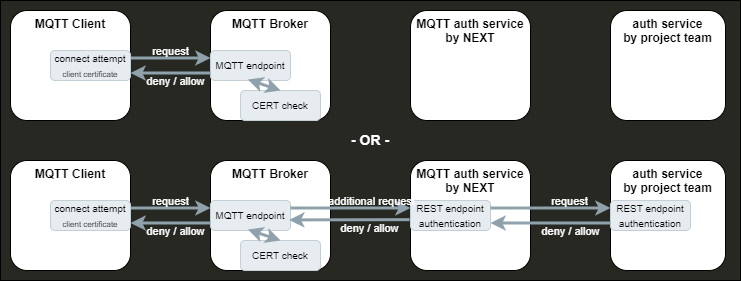
Username / Password
Clients may authenticate using a username and password.
This requires an authentication service endpoint within your application.

Authentication service endpoint
Configured within your project settings, the authentication service endpoint is invoked with each client’s details. The service must determine whether to permit or deny the connection.
Request Format
The endpoint receives an HTTP POST request containing JSON-formatted client information:
{ certCommonName string certSubject string username string password string}- certCommonName and certSubject are corresponding information from a client certificate
- username and password are corresponding information from a username/password connection
The message can contain additional information
Example Request
for an incoming client connection with username “user” and password “password”
{ "certCommonName": "", "certSubject": "", "username": "user", "password": "password"}Expected Response
The service has to response with an HTTP status code 200 and body in the following format
{ result string Enum:[ allow, deny ]}Example Denial response
{ "result": "deny"}Unanticipated Endpoint Behavior
Unavailable services or unexpected responses default to a “deny,” preventing client connection.
Authorization
Clients must be authorized for topic subscriptions or publications.
Authorization service endpoint
In this case, an authorization service endpoint within your Kubernetes namespace is required, following the guidelines below.
The service endpoint is called with client and request details to authorize actions.

Request Format
The endpoint receives an HTTP POST request with JSON-formatted data:
{ certCommonName string certSubject string username string topic string action string Enum:[ subscribe, publish ]}where
- certCommonName and certSubject are corresponding information from a client certificate
- username is corresponding information from a username/password connection
- topic and action are corresponding to the publish / subscribe request
The message can contain additional information
Example Request
for an incoming subscribe request on topic “test/test” from connection with username “user”
{ "certCommonName": "", "certSubject": "", "username": "user", "topic": "test/test", "action": "subscribe"}Expected Response
The endpoint has to response with an HTTP status code 200 and a JSON body indicating the result:
{ result string Enum:[ allow, deny ]}Example Denial Response
{ "result": "deny"}Unanticipated Endpoint Behavior
Unavailable services or unexpected responses default to a “deny,” preventing client actions.
Authorization per templates
Alternatively, for static rules, templates can be used available. Provide these to the NEXT team for configuration. For templates no authorization service endpoint is needed.

Authorization Templates
Templates consist of operation type, permission, and topic pattern:
{ operation string Enum:[ all, publish, subscribe ] permission string Enum:[ allow, deny ] template string}Operation
Operation defines the type of operation which should be covered with this template.
It can handle publish OR subscribe requests OR can be valid for publish and subscribe (all)
Permission
Permission defines the action which should be responded if the operation and template matches to the request.
Template structure
Template defines the MQTT topic or topics which should be handled with this template.
Topics can contain placeholders which will be replaced for each request for testing a possible match.
The placeholders are :
- ${clientid} which will be replaced with the client id from MQTT connection
- ${cert_common_name} which will be replaced with the cert_common_name from client certificate
- ${cert_subject} which will be replaced with the cert_subject from client certificate
- ${username} which will be replaced with the username from username/password based authentication
- * which will be handled like the * placeholder in MQTT topics (level wildcard)
- # which will be handled like the # placeholder in MQTT topics (multilevel wildcard)
Template Prioritization
In collections with multiple templates, the first match determines the response.
OpenAPI JSON file
Your service must implement the interface detailed in the OpenAPI JSON file to utilize authentication and authorization functionalities.
OpenAPI JSON file
{  "openapi": "3.0.0",  "info": {    "description": "This is the communication interface between the netilion MQTT broker instance and the project authentication service",    "version": "0.1.0",    "title": "Swagger mqtt-auth-service"  },  "servers": [{    "url": "http://localhost:8000/",    "description": "localhost"  }],  "tags": [    {      "name": "authentication",      "description": "authentication handler"    },    {      "name": "authorization",      "description": "authorization handler"    }  ],  "paths": {    "/authentication": {      "post": {        "tags": [          "authentication"        ],        "summary": "requests an authentication",        "description": "",        "operationId": "postAuthentication",        "requestBody": {          "description": "authentication request object",          "required": true,          "content": {            "application/json": {              "schema": {                "$ref": "#/components/schemas/IncomingDataAuthentication"              }            }          }        },        "responses": {          "200": {            "description": "successful request",            "content": {              "application/json": {                "schema": {                  "$ref": "#/components/schemas/ApiResponse"                }              }            }          }        }      }    },    "/authorization": {      "post": {        "tags": [          "authorization"        ],        "summary": "authorization requests",        "description": "Returns authorization information based on the result",        "operationId": "postAuthorization",        "requestBody": {          "description": "authorization request object",          "required": true,          "content": {            "application/json": {              "schema": {                "$ref": "#/components/schemas/IncomingDataAuthorization"              }            }          }        }        ,        "responses": {          "200": {            "description": "successful request",            "content": {              "application/json": {                "schema": {                  "$ref": "#/components/schemas/ApiResponse"                }              }            }          }        }      }    }  },  "components": {    "schemas": {      "IncomingDataAuthentication": {        "type": "object",        "properties": {          "certCommonName": {            "type": "string"          },          "certSubject": {            "type": "string"          },          "clientId": {            "type": "string"          },          "peerHost": {            "type": "string"          },          "username": {            "type": "string"          },          "password": {            "type": "string"          }        },        "example": {          "username" : "myUserName",          "password" : "myPassword"        },        "xml": {          "name": "IncomingDataAuthentication"        }      },      "IncomingDataAuthorization": {        "type": "object",        "properties": {          "action": {            "type": "string",            "enum": ["subscribe", "publish"]          },          "certCommonName": {            "type": "string"          },          "certSubject": {            "type": "string"          },          "clientId": {            "type": "string"          },          "peerHost": {            "type": "string"          },          "protoName": {            "type": "string"          },          "topic": {            "type": "string"          },          "username": {            "type": "string"          }        },        "example": {          "action" : "subscribe",          "username" : "myUserName",          "topic" : "myRoot/myTopic"        },
        "xml": {          "name": "IncomingDataAuthorization"        }      },
      "ApiResponse": {        "type": "object",        "properties": {          "result": {            "type": "string",            "enum": ["allow", "deny"]          }        }      }
    }  }}
Metrics
The mqtt auth service currently provides the following metrics on the HTTP connections to the endpoints provided in your kubernetes namespace.
If more metrics from mqtt-auth-service are needed, please ask NEXT team.
Authentication Failed Requests
tenant_authentication_api_requests_failed_totalA counter for failed requests from authentication client to tenant endpoints
Authentication Successful Requests
tenant_authentication_api_requests_successful_totalA counter for successful requests from authentication client to tenant endpoints. It won’t distinguish between deny and allow responses.
Authorization Failed Requests
tenant_authorization_api_requests_failed_totalA counter for failed requests from authorization client to tenant endpoints
Authorization Successful Requests
tenant_authorization_api_requests_successful_totalA counter for successful requests from authorization client to tenant endpoints. It won’t distinguish between deny and allow responses.